Monday, January 29, 2007
Introducing the Developer Knowledge Base
The good folks over at code.google.com have launched a Developer Knowledge Base, where most of the Google developer products are represented, including Google Desktop Gadgets. There's a series of Getting Started articles, which combined with the improved documentation and new tutorial makes it easier than ever to learn how to create gadgets. And there's a growing collection of How To's and Gadget Best Practices that can help elevate your skills.
This is just the beginning, so please post any suggestions, feedback or article ideas to our Developer Forum.

Monday, January 22, 2007
New Tutorial: Modifying Hello World
If you're at all interested in writing desktop gadgets, take a look at Modifying Hello World. It's the first of several tutorials we plan to offer. Even if you don't know XML or JavaScript, you can complete this tutorial — it gives you all the code you need. Of course, we hope that you'll go on to write your own code. To encourage that, the tutorial lists a bunch of ideas for what to do next.
Even if you're an experienced developer, you might learn something here. (OK, maybe you won't, but you'll almost certainly have ideas for improving this tutorial or writing new ones, and we'd love to hear from you.)
This tutorial covers everything you need to create your first gadget, from downloading the SDK to editing a gadget's code and packaging the gadget so other users can run it. Along the way, you'll add a bit of pizazz to the SDK's Hello World sample, in the form of animated text.
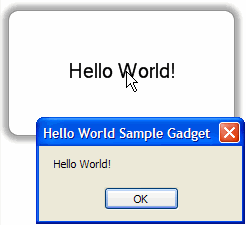 | 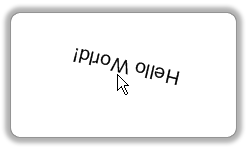 |
| The original Hello World gadget | The improved Hello World gadget (with rotating text!) |
And make sure to check out our Developer Forum to share your thoughts about creating desktop gadgets.
Wednesday, December 20, 2006
New Sidebars for All
Happy Holidays! Santa has delivered Google Desktop 4.5 in 27 more languages -- and the Japanese version is also coming out of beta. Now everyone can take advantage of new features, including:
Transparent Sidebar - The new Sidebar fits seamlessly with your desktop environment. Gadgets look right at home in the Sidebar and content-heavy gadgets are easier to tell apart with new frames and icons. And you can still have the Sidebar "Always on top," "not on top," or in "Auto-hide" mode.
Compatibility with the latest software - This new version is compatible with Microsoft Vista, Office 2007 and Mozilla Firefox 2.0.
The Google Desktop documentation and SDK have also been updated. It's easier than ever for first-time and experienced developers to create gadgets. We can't wait to see more of them!
Subscribe to:
Posts (Atom)